Tour operators ask.
You confirm.
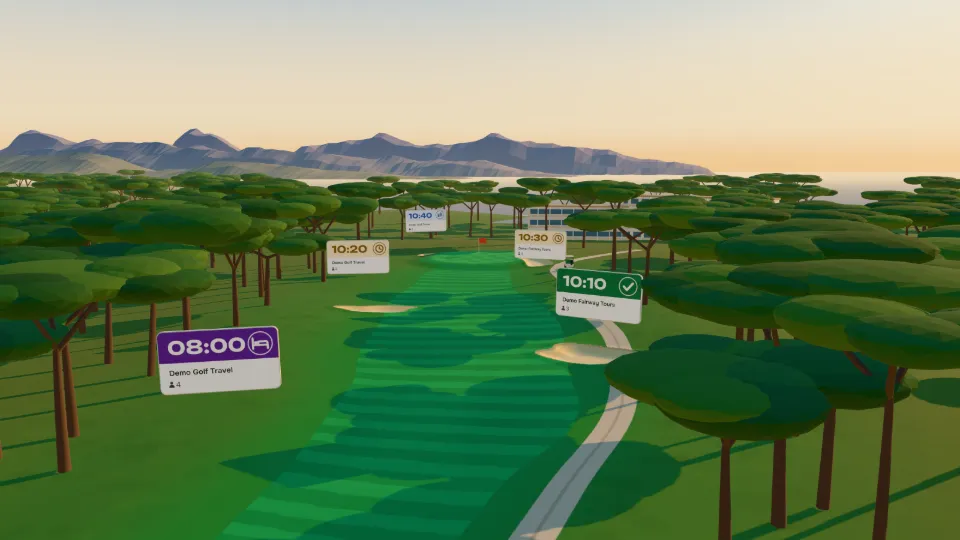
For golf courses that take tee-time requests from many tour operators. The requests arrive in one panel and land on your tee sheet, instead of in phone calls, WhatsApp chats and e-mail threads.
Runs in any browser, nothing to install. The demo needs no sign-up. Its sample data stays in your browser.
- Hotel guests
- Hotel guests
- Hotel guests
- Hotel guests
- Hotel guests
- Hotel guests
- Hotel guests
- Hotel guests
- Hotel guests
- Hotel guests
- Hotel guests
- Hotel guests
Today every request is a conversation.
A course that sells through tour operators answers the same questions many times a day: is this time free, for how many golfers, and is the group staying at one of our hotels.
- Phone and WhatsApp
The operator calls or writes. Someone checks the tee sheet, finds a time and writes back. Then the group size changes, and it starts again.
- E-mail
Requests and changes sit in long threads. When a change stays in one person’s inbox, two groups can end up on the same time.
- Spreadsheets
The times kept for hotel guests and each operator’s allotment are checked by hand on every request.
GolfReserve Pro puts this traffic on one tee sheet. The request, the answer and every change stay in one place, and the course and the operator see the same status.
From request to confirmed tee time in three steps
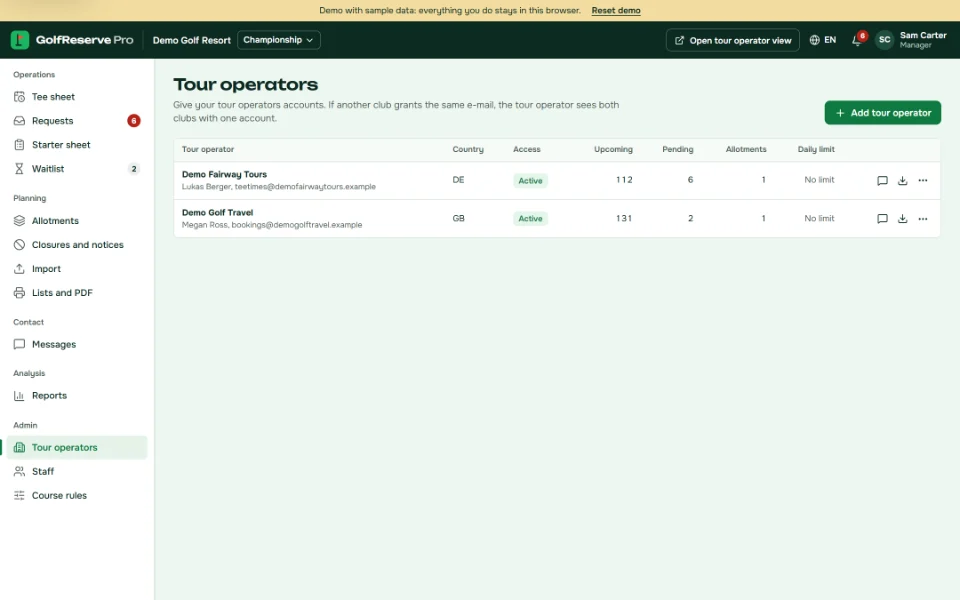
You open the tour operator accounts. Operators sign in from a browser on a computer or a phone.
The course gives tour operators accounts
Add the operators you work with by e-mail address. Each one sees only the courses you give it access to, with its own allotments and daily limits.
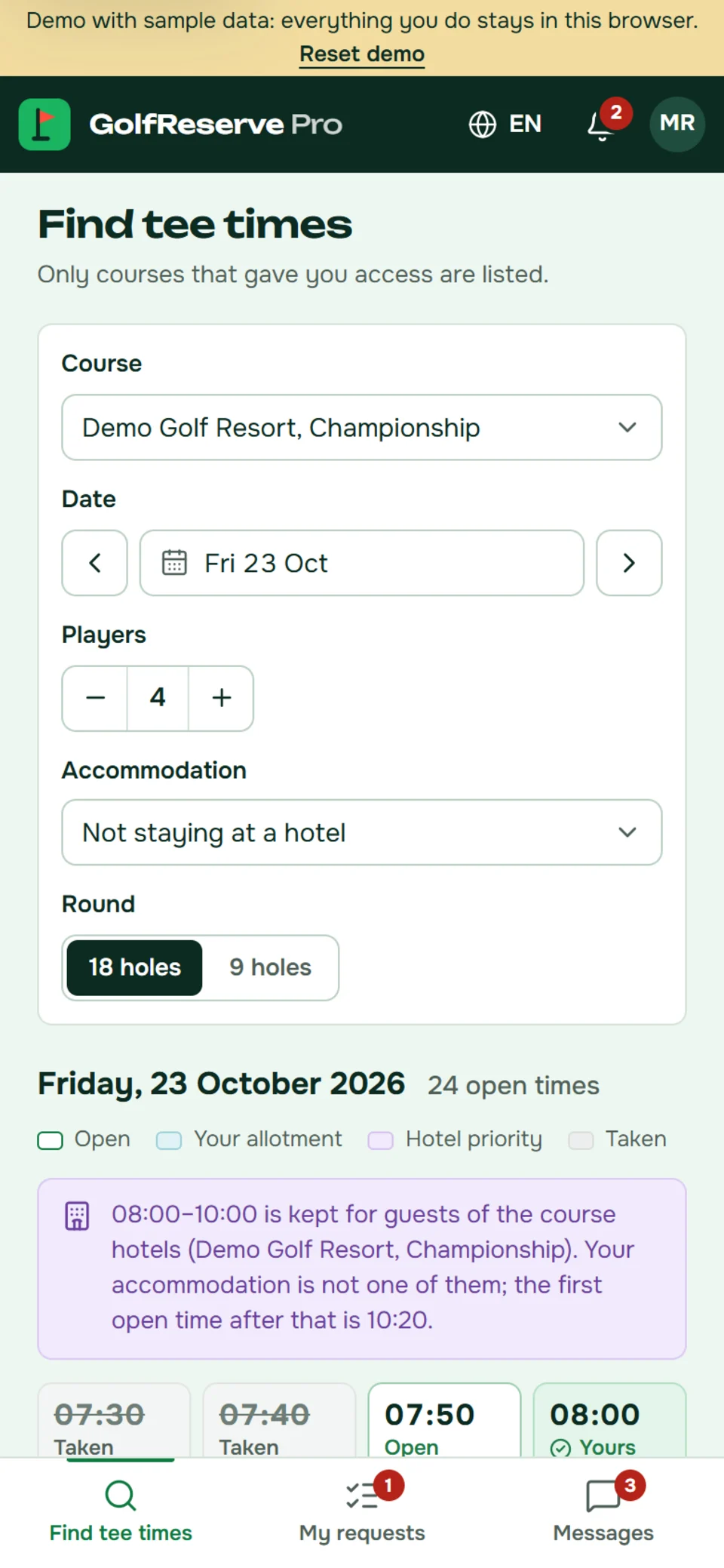
The tour operator sends a request
It picks the course, the date, the number of golfers and the accommodation, and sees the open tee times. Times kept for hotel guests show as locked, with the reason.
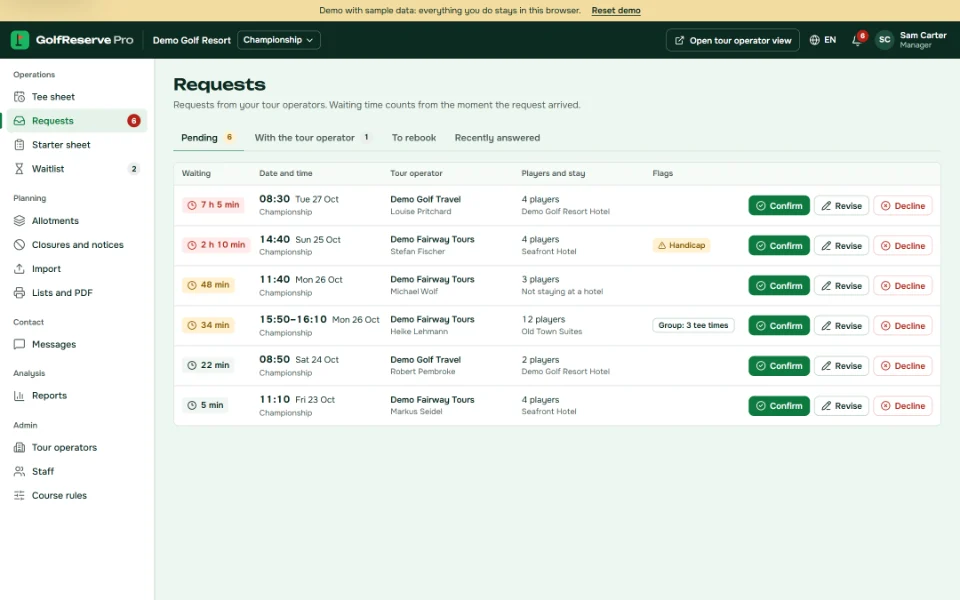
The course confirms, revises or declines
Confirm in one click, propose another time with the change shown old and new, or decline with a reason and the nearest open times. The operator sees the answer in its panel and prints the voucher.
Screens from the demo, with its sample course and tour operators.
The tee sheet follows your rules.
One club, several courses: each has its own start times, intervals and hotel window.
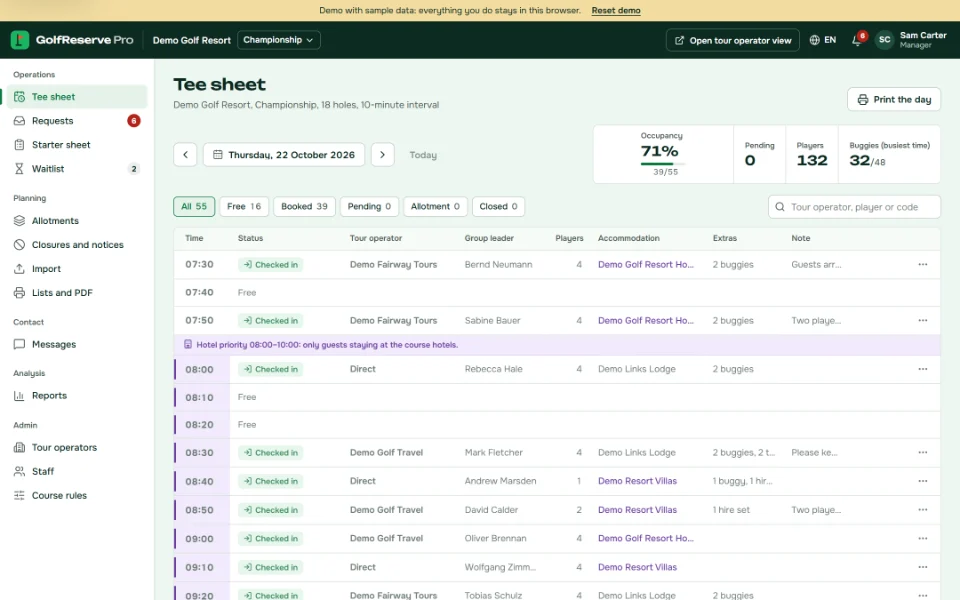
- Tee sheet. Any interval from 6 to 20 minutes, 8 and 9 in turn if you like, set by season, weekday and time of day. Add a time between two others, block a few with a reason, and sell 9-hole rounds as well.
- Two-tee starts. Mornings from the 1st and 10th keep the turn free: no new group starts while the first groups cross to the other nine.
- Requests. Each request shows how long it has waited. A decline needs a reason; a revision shows the old and new values side by side.
- Allotments. Give an operator a block of times by dates, weekdays and time window. Unused times return to general sale a set number of days before.
- Closures. Aeration, a tournament or the weather: the bookings it affects are listed, and the operators are told in their panel.
- Starter sheet and lists. Check-in, no-shows and buggy numbers. Daily lists print or save as PDF.
- Import. Bring in the bookings you already have from Excel, CSV, Word or PDF. Rows that do not fit are listed with the reason.
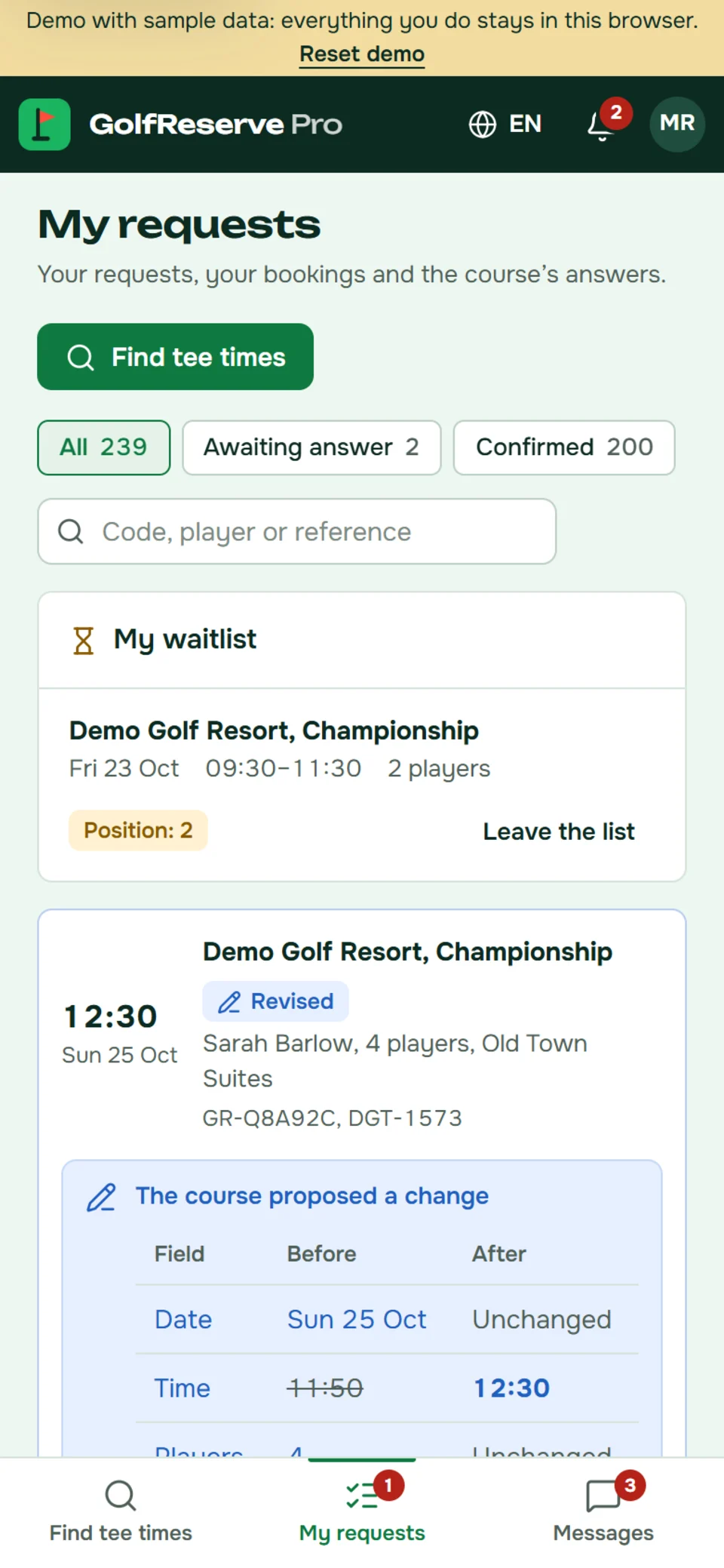
Tour operators book from their phones.
The operator screens were designed for the phone first. Operator accounts are free.
- Courses. Only the courses that gave access, with their open times.
- Exact time or a window. The operator asks for an exact time, a window such as Morning, or any time, and sees how many times are free. The course confirms the exact time.
- One-screen request. Golfers and handicaps, accommodation, buggies, trolleys, club hire and the operator’s own reference.
- My requests. The status of every request, the course’s proposed changes and the cancellation deadline.
- Waitlist. When a time is taken, the operator can wait for it and is offered the time if it opens.
- Vouchers. A voucher for each confirmed tee time, in English or Turkish. Its QR code carries only the booking code.
What it does not do
GolfReserve Pro handles tour operator requests and the tee sheet they land on. Full club systems cover far more; this one stays small on purpose.
- Payments
It takes no green fees, deposits or card payments, and keeps no prices or revenue.
- Shop and restaurant
There is no point of sale.
- Members
It does not manage members or memberships.
- Pricing
There are no rate rules and no dynamic pricing.
- Public booking
Individual golfers cannot book online. It is for the course and its tour operators.
- Connections
There is no API or channel manager link yet. Bookings come in as Excel, CSV, Word or PDF files and go out as CSV or PDF.
- E-mail and SMS
The demo sends no e-mail or text messages. Notifications appear inside the panel.
First 30 days free
We set up your courses, rules and tour operator accounts with you, and import the bookings you already have. The 30 days start on the day your team starts using it, and your operators use it at no cost. After that you decide whether to continue; nothing renews on its own.
- All your courses and tee sheets
- Tour operator accounts, free for operators
- Staff accounts for manager, reservations and starter
- Hotel priority, allotments and closures
- Import of your current bookings
- Vouchers, the starter sheet and reports
€249 per club per month
One fixed monthly fee per club, for up to 36 holes, after the first 30 days. No setup fee and no commission. Pay for a year and the last two months are free. Tour operators never pay.
Questions
Do we or our tour operators need to install anything?
No. GolfReserve Pro runs in any current browser on a computer, tablet or phone. There is nothing to install, for you or for your operators.
What happens to the bookings we already have?
You import your list as Excel (XLSX, XLS), CSV, a Word table or PDF. Columns are matched automatically and you can change the match. Every row is either imported or listed in a report with its reason; no row is dropped silently.
Can we use it next to our club management system?
Yes. It handles the tour operator side. There is no live connection to other systems yet, so bookings move between them as files.
Which languages does it support?
The screens and the vouchers are in English and Turkish.
Where is the data kept?
In the demo, data stays in your browser and never reaches a server, and the sample data is rebuilt each day. For a pilot, we tell you in writing where your data will be hosted before you start.
What do tour operators pay?
Nothing. Operator accounts are free; only the club pays, after the first 30 days.
Does it take payments?
No. It collects no green fees or extras and keeps no prices. Buggies, trolleys and club hire are paid at the course, as today.
Talk to us
Tell us about your course: how many tour operators send you requests, and how they send them today. We will open the demo with your interval and hotel window, and set up a pilot if it fits.